

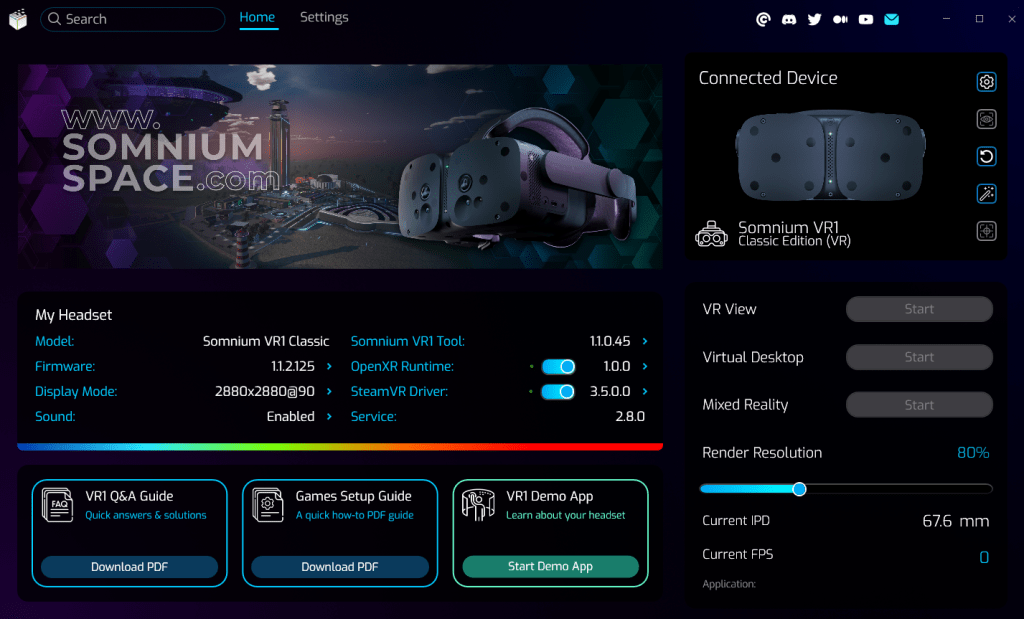
Somnium Space announced its most groundbreaking VR1 software release to date: Somnium VR1 Tool 1.1.0.45. This update is indeed massive, and according to Somnium fueled by the feedback of the growing community of dreamers, creators, and innovators. Among the improvements are a 30 to 40 percent performance boost, cutting edge mixed reality, enhanced eye tracking, and a suite of new tools to elevate any user’s VR experience.
Let’s have a closer look.
A Robust Foundation for Immersive VR
There are some foundational changes to the tool. Among them are an updated Somnium Service, and new Somnium components that replace the legacy (VRg) ones. There’s also a new config system and folder structure. Somnium mentions that legacy configs are no longer compatible, so users should manually reapply settings in the new tool.
One of our favorites is a new VR1 Demo App, which can be launched right from the VR1 Tool’s home screen and allows you to explore all VR1 features in one immersive experience.

Unleashing Next Level Performance
Performance is the cornerstone of this update, delivering a 30 to 40 percent boost across most OpenXR applications for smoother, more fluid visuals. The release supports multiple refresh rates, 72Hz, 90Hz, and an experimental 120Hz, requiring firmware 1.1.5.128, and includes compatibility fixes for NVIDIA RTX 50xx GPUs. All these upgrades ensure that whether you’re exploring vast virtual landscapes or competing in VR gaming, the Somnium VR1 delivers unparalleled speed and clarity.
Mixed Reality and Eye Tracking
Mixed reality reaches new heights as well with enhanced image quality, auto exposure, and vivid color profiles. The new ultrawide MR camera mode, 3968 by 2352 at 75 FPS, and additional compensation options create a stunning blend of virtual and real worlds. Eye tracking is better than ever, with improved algorithms, a special calibration mode for VROptician lenses and informative in headset overlay messages. The updates truly unleash more of the power of the VR1 and make interactions more intuitive, whether you’re hosting events or crafting intricate designs in VR.
Broad Compatibility and SteamVR Enhancements
But there’s more. Somnium writes that this update contains fixes for Unreal Engine 5.2+ and OpenKneeBoard. Somnium also added dynamic foveated rendering for MSFS 2024 and compatibility has improved for the likes of DCS, iRacing, LMU, Falcon BMS, and Autodesk VRED. Good news for all you gamers, designers and engineers out there.
As for SteamVR, driver v3.5.0 redefines rendering with a new pipeline controlled directly by SteamVR, a higher resolution lens warping mesh, and support for multiple refresh rates. Native SteamVR overlays for Virtual Desktop, Eye Tracking, and Mixed Reality, paired with the updated Ultraleap Runtime v6.1.0.1, deliver a refined experience for SteamVR users.
A Smarter, More Customizable Interface
We also like that VR1 Tool’s user interface has been overhauled. It looks slick and smooth. There’s a polished Setup Wizard, custom fan speed options, and new hardware button functions, like toggling Eye Tracking or switching between Passthrough and Masked MR modes. There are also separate top and bottom vertical FOV adjustments, while advanced logging will for sure cater to tech enthusiasts.
Setting up and installing everything was effortless, and we instantly felt at home with the new tool.
Powered by the Community
Somnium Space highlights that this update is a tribute to the community’s passion and collaboration. From the new Demo App to enhanced performance and mixed reality, every feature reflects the vision of the users.
Note that for those preferring legacy setups, the VR1 Legacy Tool is also available on the website.
About Somnium Space
Somnium Space, the company behind the VR1, also runs a blockchain-based virtual reality platform that allows users to create, experience, and monetize content and applications. The platform is committed to building a decentralized and immersive VR world that offers users a unique and engaging experience.
Discord: https://discord.gg/somniumspace
Authencity: https://authencity.io/user/somniumspace
Follow the Somnium Times
Authencity: https://authencity.io/user/SomniumTimes
YouTube: https://www.youtube.com/@SomniumTimes
Instagram: https://www.instagram.com/somniumtimes/


Leave a Reply